Why Is My Website Slow? The Real Reasons and Fixes
Slow sites quietly lose customers and Google rankings. Here are the real reasons a site drags — images, hosting, bloat — and how I build ones that fly.

Web Developer & Founder, Ali Samadi Agency
There’s an old joke that the best place to hide a dead body is page two of Google. The runner-up is a website that takes six seconds to load — nobody’s sticking around to find it either. If you’ve ever watched your own homepage crawl in on a phone and quietly died a little inside, this one’s for you.
I build and rebuild sites for a living, so people ask me all the time: why is my website slow? The honest answer is that it’s almost never one mysterious thing. It’s a short list of ordinary ones, and every item on it is fixable.
The Direct Answer
Why is my website slow? Most slow websites come down to a handful of fixable causes: oversized images, cheap shared hosting, no caching or CDN, and bloated code from page builders and plugins. On mobile — where most of your visitors actually are — every one of those hits harder. The usual culprits:
- Huge, unoptimized images loading at full camera resolution
- Cheap shared hosting with a slow server response
- No caching and no CDN, so every visit rebuilds the page from scratch
- Plugin and page-builder bloat piling on scripts you never use
- A mobile experience nobody tested on an actual phone
The fix is rarely one switch. It’s building lean, then measuring — which is exactly the part most sites skip.
None of that requires a computer science degree to understand, so let’s walk through where the seconds actually go.

What actually makes a website slow
Every sluggish site I’ve opened up is some mix of these. In rough order of how often they’re the real villain:
- Images. The biggest one, by a mile. A photo straight off a phone is 4–8 MB. Drop ten of those on a page and you’ve built a 50 MB homepage that no connection loves. Properly sized and compressed, those same images are a few hundred kilobytes.
- Hosting. Cheap shared hosting crams hundreds of sites onto one server. When your neighbor gets a traffic spike, your site pays for it. A slow server response — the time before anything even starts loading — is often baked in at the hosting level.
- No caching or CDN. Without caching, your server rebuilds the same page for every single visitor. A CDN serves your files from a location near the visitor instead of one server in Virginia. Skip both and everyone waits the long way around.
- Bloat. Every plugin, tracker, and page-builder widget adds scripts. Most sites load code for features they don’t even use. It all has to download and run before the page feels ready.
Notice what isn’t on that list: your content, your copy, your actual business. The slowness is almost always plumbing, not the house.

The platform tax — why Wix, WordPress, and GoDaddy sites feel slow
If you’ve searched why is my Wix website so slow, or the WordPress or GoDaddy version of that question, you’ve found the pattern already. These platforms trade speed for convenience, and it’s usually a fair trade — until it isn’t.
Here’s the mechanism. A site builder has to be everything to everyone, so it ships a giant pile of general-purpose code to render your specific, simple page. WordPress then stacks plugins on top, each one loading its own scripts and often its own copy of the same library. GoDaddy’s cheaper hosting tiers add a slow server response on top of that. Each layer is small. Together they’re a website that scores 40 on mobile and a business owner wondering what happened.
I’m not here to tell you to burn your Wix site down this afternoon. If it works and you’re getting customers, that’s the point of a website. But if the thing feels slow and you can’t fix it no matter how many “speed” plugins you install, that’s not you doing it wrong. That’s the platform tax, and past a certain point the only real fix is code that only does what your site actually needs.

Slow on mobile is the one that actually costs you
Ask why your website is loading slow on mobile and you’ve found the version of this problem that touches money. Most of your visitors are on a phone, on a patchy connection, with a fraction of a laptop’s patience.
The numbers back it up: Google’s own research found that 53% of mobile visits are abandoned if a page takes longer than three seconds to load. More than half your traffic, gone before they see a word. And speed is a confirmed Google ranking factor through Core Web Vitals — so a slow site doesn’t just lose the visitors it has, it gets shown to fewer of them in the first place. Slow quietly taxes both ends: fewer people find you, and more of the ones who do give up.
That’s why “it looks fine on my laptop” is a trap. Your laptop is on office wifi with the page already cached. Your customer is one bar of signal in a parking lot, deciding whether you’re worth the wait.
What a fast site looks like — my numbers, in public
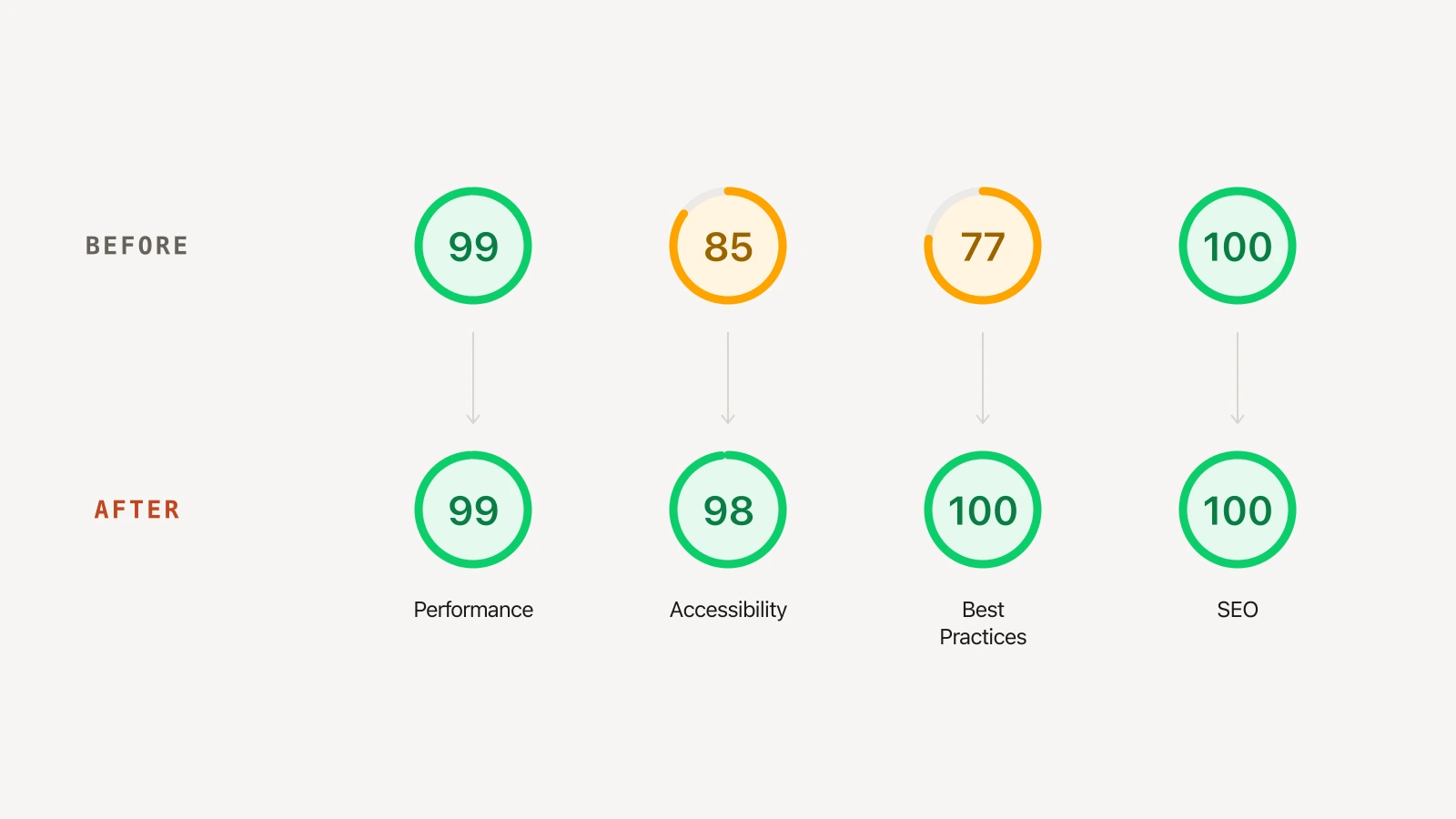
I’d rather show than tell. Last week my own agency site scored 85 on accessibility and 77 on best practices — not terrible, not good enough. I spent a morning fixing it. Here’s the before and after, straight from Google Lighthouse:
| Lighthouse category | Before | After |
|---|---|---|
| Performance | 99 | 99 |
| Accessibility | 85 | 98 |
| Best Practices | 77 | 100 |
| SEO | 100 | 100 |
Now the opinion I’ll stand behind: a slow website is a decision, not bad luck. Somebody chose the bulky template, skipped the image compression, and never opened it on a real phone. Every one of those is reversible. The sites I build score in the high 90s not because I’m clever, but because I don’t ship anything the page doesn’t need — no unused scripts, images sized to fit, hosting that answers fast, and I test on a throttled phone before it goes live. That’s the whole trick. It’s discipline, not magic. I recently took a client’s nonprofit site from a 20-second load down to about two — here’s exactly how I fixed that slow website, step by step. If you want the broader build process, I wrote up my four-step web design process separately.
When a slow website isn’t worth fixing
Truth that costs me work: sometimes the speed isn’t the problem worth solving yet.
- Nobody’s visiting it. If your site gets twelve visits a month, shaving two seconds off the load time won’t move your business. Go get traffic first, then make it fast.
- It’s a placeholder for a brand-new idea. If you’re still testing whether the business itself works, a slow one-pager is fine. Prove the idea, then invest in the site.
- The slowness is one bad plugin. If a single tool is dragging everything down, you don’t need a rebuild — you need to delete that plugin. Try the free fix before you pay anyone, me included.
A rebuild earns its cost when the site actually matters to your revenue — when customers judge you by it, when you’re spending on ads that land on a page that makes them wait. Before that, a slow site is a small problem wearing a big costume.
Straight answers
Why is my site so slow? Almost always oversized images, cheap hosting, missing caching or CDN, and script bloat from plugins and page builders — usually a few of those at once. Test it first to find which one is the real weight, then fix that one.
Why is my Wix, WordPress, or GoDaddy website so slow? Site builders ship heavy general-purpose code to render simple pages, WordPress stacks plugin scripts on top, and cheaper hosting tiers add a slow server response. It’s the tradeoff for convenience; past a point, only leaner code fixes it.
Why is my website loading slow on mobile? Phones have less processing power and worse connections than your laptop, so heavy images and scripts hurt more. If it “looks fine” on your computer, that’s cached office wifi — test on a throttled phone instead.
Does website speed affect SEO? Yes. Google uses Core Web Vitals as a ranking signal, and slow pages get shown to fewer people. Speed also affects how many visitors stay, which indirectly feeds rankings too.
How do I test my website speed? Run your URL through Google Lighthouse (built into Chrome) or PageSpeed Insights, free. Both give you a score and a list of what’s slowing you down. Test the mobile score, not just desktop — that’s the one that counts.
So if your site feels slow, the answer usually isn’t a mystery — it’s a checklist. Start with the images, look hard at your hosting, and open the thing on your phone like a customer would. If you’d rather someone just build you one that’s fast from the first day, that’s the job: my web design and development in Jacksonville covers how I work, or the pricing page has the numbers with no decoder ring required. Fast shouldn’t be a premium. It should be the floor.
Image credits: Photos by panumas nikhomkhai, Tranmautritam, and Michael Burrows on Pexels. Lighthouse scores from my own site.